Grammarly Alternative
Grammarly is one of the most recognized writing tools available, but it is not the right fit for everyone. Cost is the most common reason writers look for a Grammarly alternative — the premium plan runs over $140 per year, which is difficult to justify for casual writers, students on a budget, or small businesses managing multiple tools. Beyond price, writers also look elsewhere when they need specialized features: deeper plagiarism checking, better academic writing support, or a lighter tool that does not slow down their browser.
Grammar correction and plagiarism checking are two separate needs — but both matter before you publish or submit any piece of writing. This guide covers the best Grammarly alternatives in 2026 and explains why pairing any grammar tool with a dedicated plagiarism checker like PlagScanPro gives you complete coverage.
Why Look for a Grammarly Alternative?
Grammarly works well for general proofreading, but it has real limitations depending on how you write.
Budget is the first barrier. The free version covers only basic spelling and grammar corrections. Advanced suggestions — tone, clarity, plagiarism checking — sit behind a paywall that many users find difficult to justify for occasional use.
Feature gaps are the second issue. Academic writers often need citation guidance and deeper originality checks. SEO writers need readability scoring and keyword-aware editing. Bloggers want a lightweight tool that does not interfere with their CMS. Grammarly's one-size approach does not always serve these specific workflows.
Finally, some users simply prefer tools that work offline, integrate with different platforms, or offer more transparent pricing. A Grammarly alternative does not need to do everything Grammarly does — it just needs to do the right things for your specific writing process.
What Features Should a Grammarly Alternative Offer?
Not every writing tool needs every feature, but a strong Grammarly alternative should cover the basics well:
- Grammar checking and spelling correction
- Punctuation suggestions
- Readability improvement
- Tone suggestions for different audiences
- Browser extension or document upload support
- Fast performance without heavy resource use
- Plagiarism checking or integration with a dedicated plagiarism scanner
- A clean, user-friendly interface
Plagiarism checking deserves special attention here. Many grammar tools treat it as an add-on. If originality matters to your work — for academic submissions, client content, or SEO publishing — a standalone plagiarism scanner used alongside your grammar tool gives more reliable results than a bundled feature.
Best Grammarly Alternatives in 2026
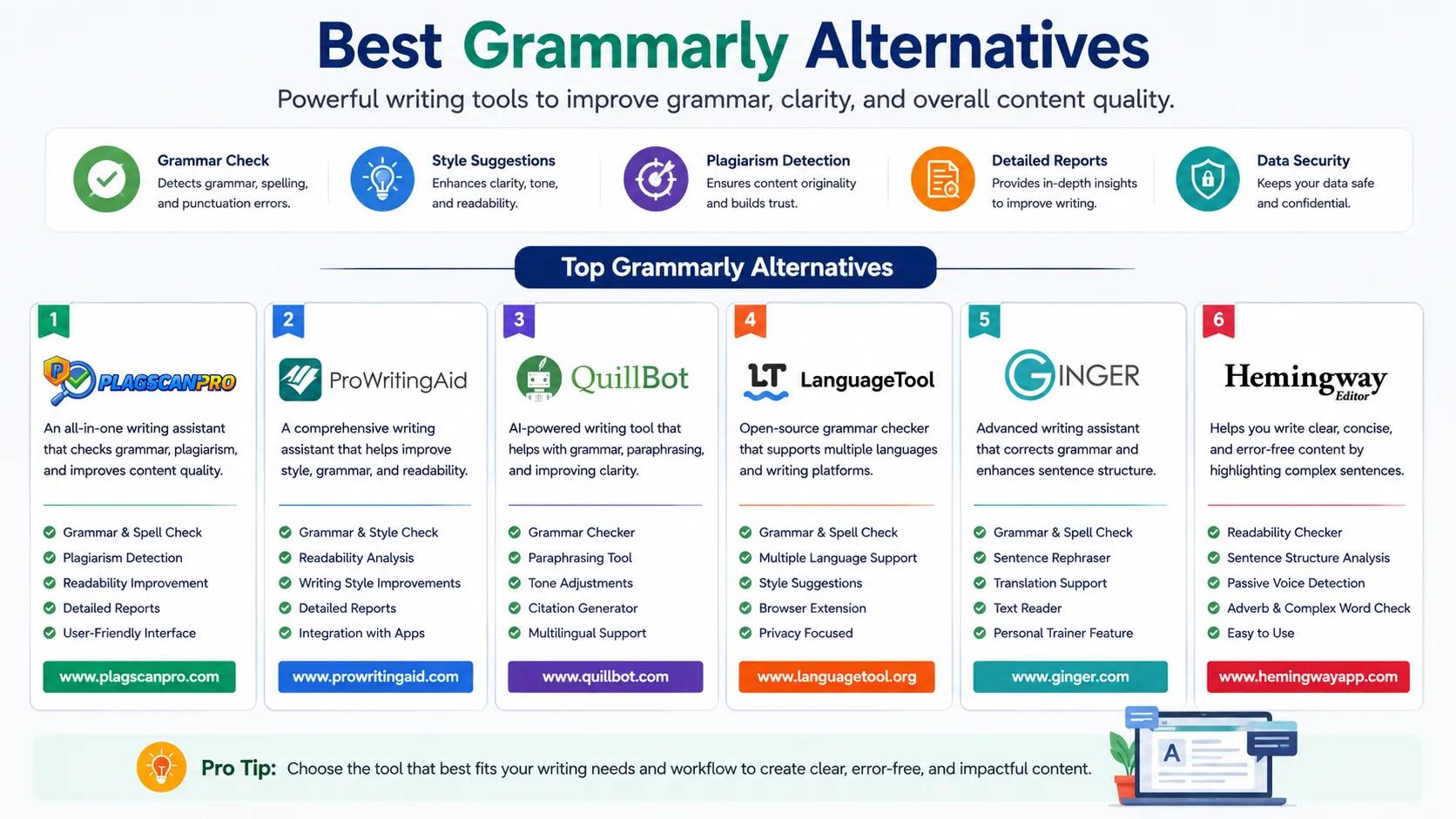
LanguageTool — The strongest free option for multilingual writers. Supports over 30 languages and works across browsers, desktop apps, and document editors. The free tier is genuinely useful without an upgrade.
ProWritingAid — Best for long-form and academic writing. Offers deep style analysis, readability reports, and over 20 writing reports in one dashboard. Popular with novelists and researchers.
Hemingway Editor — Built for clarity. It highlights complex sentences, passive voice, and readability issues at a glance. No grammar correction, but excellent for tightening prose before final editing.
QuillBot — Known for its paraphrasing engine. Writers use it to rephrase sentences, adjust tone, and improve flow. The free plan covers basic rewriting without a subscription.
Ginger Software — A solid everyday grammar checker with sentence rephrasing and a built-in dictionary. Works well for business writing and non-native English speakers.
PlagScanPro — Not a grammar tool. PlagScanPro is a dedicated plagiarism checker that writers use alongside grammar tools to verify content originality before submission or publication. It belongs in this list because complete writing quality requires both grammar correction and originality verification.
Why Use PlagScanPro Alongside Grammar Tools?
PlagScanPro is a plagiarism checker — not a grammar checker, writing assistant, or tone rewriter. Its function is specific: scan your finished document and confirm that it does not match existing published content before it goes out.
Here is what PlagScanPro does:
- Scans documents up to 50,000 words in a single session
- Produces a detailed similarity report with plagiarism percentage breakdown
- Highlights flagged passages and links each one to its matched source
- Supports multiple document formats including PDF, DOCX, and plain text
- Processes uploads securely without storing or republishing submitted content
- Delivers results fast with a straightforward, easy-to-use interface
PlagScanPro is used by students verifying essays before submission, bloggers checking purchased or outsourced content, teachers reviewing student work, researchers confirming paper originality, agencies auditing content at scale, and publishers protecting against duplicate content penalties.
What PlagScanPro does not do: it does not correct grammar, suggest rewrites, check tone, or function as a writing assistant of any kind. It does one thing — plagiarism scanning — and does it accurately.
Pairing any grammar tool from this list with PlagScanPro covers both sides of writing quality: correctness and originality.
Which Tool Should You Choose?
Your choice depends on what you actually need:
- For everyday grammar correction: LanguageTool (free) or Grammarly (paid)
- For academic writing: ProWritingAid for style depth, PlagScanPro for originality verification before submission
- For SEO and blog content: Hemingway for readability, PlagScanPro to check outsourced or repurposed content
- For paraphrasing and rewriting: QuillBot for sentence-level changes
- For business writing: Ginger Software for professional tone and grammar
- For plagiarism checking on any document: PlagScanPro, used after grammar editing is complete
Most writers benefit from using two tools: one for grammar and one for plagiarism. They solve different problems and work best when used in sequence — grammar first, then originality check before final submission.
Conclusion
The right Grammarly alternative depends on your writing type, budget, and workflow. LanguageTool, ProWritingAid, Hemingway, QuillBot, and Ginger each serve specific needs across grammar correction, readability, and style improvement.
Regardless of which grammar tool you choose, content originality is a separate step. Before you publish a blog post, submit an academic paper, or send client content, run it through PlagScanPro. A clean similarity report confirms your work is original — and that confidence is worth the extra two minutes it takes.
Visit PlagScanPro.com to run a free plagiarism check on your next document.
FAQs
What is the best Grammarly alternative?
The best Grammarly alternative depends on your writing needs. LanguageTool is the top free option for multilingual grammar checking. ProWritingAid suits academic and long-form writers. Hemingway Editor works best for improving readability and clarity. For plagiarism checking specifically, PlagScanPro is a dedicated scanner that works alongside any grammar tool.
Is there a free Grammarly alternative?
Yes. LanguageTool offers a strong free plan covering grammar, spelling, and punctuation across 30+ languages. Hemingway Editor is free in its browser version. PlagScanPro also offers free plagiarism scanning with no mandatory registration for standard document checks.
Which Grammarly alternative includes plagiarism checking?
ProWritingAid includes a plagiarism checker on its paid plan. For dedicated, accurate plagiarism scanning, PlagScanPro is the stronger choice — it scans up to 50,000 words, produces detailed similarity reports, and is built specifically for originality verification rather than grammar correction.
Is PlagScanPro a grammar checker?
No. PlagScanPro is a plagiarism checker, not a grammar tool or writing assistant. It scans documents for matching content against published sources and delivers a similarity report with a plagiarism percentage breakdown. For grammar correction, use a separate tool like LanguageTool or ProWritingAid alongside it.
Can I use Grammarly and PlagScanPro together?
Yes, and this is actually the recommended workflow. Use Grammarly or any grammar tool to correct and refine your writing first. Then upload your finished document to PlagScanPro for an originality check before submission or publication. The two tools solve different problems and work well in sequence.
Which tool is best for students?
Students benefit most from ProWritingAid for academic style and grammar depth, paired with PlagScanPro for plagiarism checking before essay or paper submission. PlagScanPro's similarity report gives students the data they need to meet their institution's originality requirements with confidence.
Which tool is best for bloggers?
Hemingway Editor improves clarity and readability for blog content. LanguageTool handles grammar without a heavy subscription cost. PlagScanPro is useful for bloggers who publish outsourced or research-heavy content and need to verify originality before posts go live.
Does plagiarism checking improve SEO?
Duplicate content directly hurts search rankings under Google's Helpful Content guidelines. Running a plagiarism check with PlagScanPro before publishing confirms your content is original — which protects your domain from duplicate content penalties and supports stronger long-term SEO performance.